Our verdict in 30 seconds: there is no single winner — it depends on who you are. Mixed teams (AEC, manufacturing, product) that manage 3D alongside photos and documents: Daminion (9.0 in this category). Game and real-time studios: Anchorpoint (8.8) for artists, Perforce Helix DAM (8.5) at enterprise scale. Web/AR delivery: echo3D (8.2).
Quick comparison
| Tool | Best for | 3D preview formats | Tier | Score |
|---|---|---|---|---|
| 1. Daminion | AEC / manufacturing, mixed archives | CAD, meshes + 100 other formats | $ | 9.0 |
| 2. Anchorpoint | Game-dev artists | FBX, OBJ, glTF, textures | $ | 8.8 |
| 3. Perforce Helix DAM | Large studios on Perforce | Meshes, textures, in-browser | $$$ | 8.5 |
| 4. echo3D | AR/web 3D delivery | glTF/USDZ pipeline | $$ | 8.2 |
| 5. Connecter | Archviz asset libraries | 3ds Max, models, materials | Free–$ | 7.9 |
| 6. Pimcore | 3D in product data (PIM) | Via plugins | Free–$$ | 7.5 |
Price tiers: $ budget · $$ mid-range · $$$ premium, quote-based. Most DAM vendors quote final pricing individually, so tiers reflect verified customer reports on G2 and Capterra rather than rate cards. Checked July 2026.
1. Daminion — best for AEC, manufacturing, and mixed 3D + media archives
Daminion
★★★★★ 4.7Best for: architecture, construction and manufacturing teams whose 3D files live next to photos, drawings and PDFs.
Pros
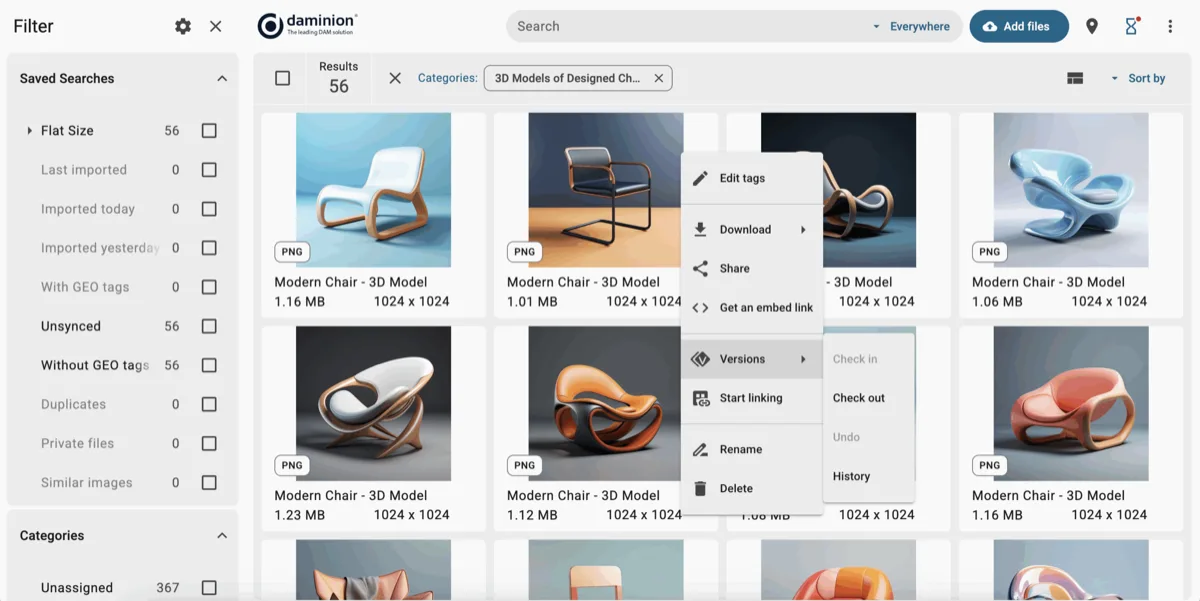
- 3D and CAD previews in the same catalog as photos, PDFs and video — the real-world AEC mix
- Quick visual snapshots of drawings without opening AutoCAD or Revit
- Version control and custom metadata (project, phase, material, client)
- On-premise deployment — where most CAD-heavy firms keep IP anyway
Cons
- No interactive mesh inspection (turntable previews, not a 3D editor)
- No game-engine integrations
- Windows-based server
Our verdict: Most "3D DAM" tools assume you're a game studio. Real 3D archives — in architecture firms, plants, product companies — are messier: Revit models next to site photos next to spec PDFs. Daminion's 3D asset management handles exactly that mix in one searchable catalog, which is why firms like DC8 Studio use it to scan floor plans without launching CAD. For that majority use case, it's our #1; pure game pipelines should read on.
2. Anchorpoint — best for game-dev artists
Anchorpoint
★★★★★ 4.4Best for: small and mid-size game teams that want Git-style versioning with visual browsing.
Anchorpoint feels like it was built by people who actually texture things: instant thumbnails for FBX, glTF, PSD, HDRI and Unreal Engine files, plus file locking and version control layered on Git (with Git LFS for TB-sized binary repos) that artists never have to understand. Integrations run deep for a tool this size — Unreal, Unity and Godot on the engine side; Blender, Maya, 3ds Max, Cinema 4D, Photoshop and Substance on the content side — which is why teams reach for it as a lighter, cheaper alternative to standing up a full Perforce server.
Pricing (2026): a genuinely free Personal tier for non-commercial single-user work; the Team plan is €20/user/month billed annually (€25 monthly), with a 50% indie discount for studios under €100k in funding and revenue, and a custom self-hosted Organization tier with SSO. It manages project files more than a company-wide archive — metadata beyond tags is thin, and there's no photo or document story — and it carries no aggregated G2/Capterra track record yet, so it earns a researched profile rather than a star rating. Within its lane, the best artist experience we tested. See the full Daminion vs Anchorpoint breakdown.
3–6: the rest of the field
3. Perforce Helix DAM — 8.5 · large studios on Perforce
If your studio already runs Helix Core — as most AAA game and large engineering teams do — Helix DAM (now branded P4 DAM) layers browser previews and artist-friendly search directly over the same depot. It renders FBX, USD, GLB/glTF, OBJ and DAE (auto-converting to GLB) so you can spin, rotate and inspect a mesh in the browser, sketch annotations straight onto the model, and route it through approval workflows with built-in Jira integration; AI-assisted tagging indexes the archive as it grows. Pricing is enterprise-quote only (Helix Core itself is free for up to 5 users), and there's a free trial. Two honest caveats: the DAM layer isn't separately rated on G2 or Capterra — the well-known scores belong to Helix Core, the version-control engine underneath — and that engine is widely praised for large-binary performance and data integrity but just as widely flagged for a steep learning curve. Little reason to adopt it unless Perforce is already your backbone. See the full Daminion vs Perforce Helix DAM breakdown.
4. echo3D — 8.2 · AR and web 3D delivery
echo3D is a cloud pipeline for delivering optimized 3D to web and AR apps rather than archiving it internally: upload once and get converted, compressed, streamable models served via API and CDN. Format coverage is broad — OBJ, STL, FBX, glTF/GLB, USD/USDZ, PLY, DAE plus CAD like STEP, IGES and SolidWorks — with server-side conversion (e.g. USDZ→GLB) and Unity/Unreal/WebAR SDKs. It's the best-reviewed tool in this roundup on the public aggregators: 4.5/5 on Capterra (169 reviews) and 4.4/5 on G2 (83 reviews), where developers praise the SDK, the cross-platform AR delivery and getting a sample app running in about half an hour. The recurring complaint is cost: storage, bandwidth and CDN credits climb with usage, and reviewers note documentation gaps on advanced features. It's a CDN-plus-DAM for runtime 3D, so teams usually run it alongside a catalog tool, not instead of one.
5. Connecter — 7.9 · archviz asset libraries
The archviz community's favourite library manager, Connecter (by DesignConnected) gives you gorgeous embedded previews of 3ds Max, Cinema 4D, Revit, Rhino, Blender, SketchUp and AutoCAD assets, with Boolean search, batch preview generation, collections and a version-control toolkit — and it comfortably handles libraries of 10,000+ local assets. It's local-first rather than cloud-native, which visualization studios tend to prefer for heavy scene files. Pricing runs on a 60-day free trial (no permanent free tier) into Solo €49/year, Duo €99/year, and concurrent-user team plans (roughly €79–129/month). It carries no G2 or Capterra footprint, so treat the enthusiasm as community and vendor testimony, not an aggregated score. Single-studio mindset and lean metadata, but every 3ds Max shop should know it.
6. Pimcore — 7.5 · 3D inside product data (PIM)
When your 3D files are really product data — attached to SKUs with prices, specs and translations — Pimcore's combined PIM + DAM fits, consolidating assets and catalogue data in one open-source platform. Reviewers rate it highly (4.7/5 on Capterra, 23 reviews; 4.4/5 on G2, ~45 reviews) and consistently praise its flexibility and the fact that one system replaces several. The trade-off is just as consistent: a steep learning curve, developer-heavy setup and a dated-looking UI — it's more a framework than a turnkey product. Crucially for this list, it is not a 3D-native previewer: FBX/USD/glTF viewing is custom development, not a built-in feature. The Community Edition is free to self-host; the enterprise PaaS runs into the tens of thousands per year (roughly €34k+). See our open-source roundup for its trade-offs.
Costs, timelines, and format reality
What each tool costs in 2026
Most DAM vendors quote 3D pricing individually, so the entry points below are the published or verified-report figures — a starting line, not a final invoice. Checked July 2026.
| Tool | Free option | Entry price | Model |
|---|---|---|---|
| Daminion | 30-day trial | Budget-tier team quote | Per-seat, covers the whole archive (3D included) |
| Anchorpoint | Free (non-commercial) | €20/user/mo (annual) | Per seat; 50% indie discount |
| Perforce Helix DAM | Trial (Core free ≤5 users) | Enterprise quote | Quote-based |
| echo3D | Always-free tier | $19/mo + usage credits | Usage-tiered (storage/bandwidth) |
| Connecter | 60-day trial | €49/yr (Solo) | Per seat / concurrent-user teams |
| Pimcore | Community (self-host) | ~€34k/yr (enterprise PaaS) | Open-source or enterprise licence |
Entry prices reflect vendor pricing pages plus verified customer reports on G2 and Capterra. Daminion covers 3D within a single team licence for the whole media archive — usually the cheapest route when 3D is one part of a larger photo, video and document collection.
Timeline: a worked example
Take a 30-person manufacturer with 200,000 mixed files (STEP, SolidWorks exports, product photos, spec sheets). With Daminion, the server is up in half a day, the archive indexes overnight, and about two days go into defining a metadata scheme (product line, revision, material) — searchable by everyone inside a week. A game studio adopting Anchorpoint moves faster per project (an afternoon), but pays it back in time spent migrating history into Git.
What if your CAD format isn't supported?
The universal fallback is a master-and-derivative pattern: batch-export lightweight glTF or PDF snapshots alongside the originals and let the DAM index those as linked previews. Every tool in this roundup handles that, and the Khronos glTF standard has become the safest interchange target for exactly this reason.
How to manage 3D assets
Good 3D asset management comes down to a few habits that hold whichever 3D asset manager — or general-purpose DAM — you settle on. Name and version consistently: a predictable scheme (chair_lowpoly_v03) beats a heap of “final_final” files, and every serious tool keeps version history so you can roll back a broken mesh. Record format-specific metadata the way you’d note a photo’s ISO — poly count, texture sets and resolution, UVs, rig and LODs, plus the authoring app and units the file was built in. Insist on a real in-browser preview, so a .fbx, .glb/.gltf, .obj or .stp/.step can be judged without opening Blender, 3ds Max or a CAD app. Finally, keep each source file (Max, Blender, Revit, SolidWorks) linked to its exported derivatives (glTF, USDZ) as one logical asset, so a change to the master propagates to everything downstream instead of drifting out of sync.
Go deeper on the three decisions that trip teams up: which 3D file format to standardize on (OBJ vs FBX vs glTF vs STEP), how to get real in-browser previews instead of grey icons, and how to version-control 40 GB scene files without losing work.
FAQ
What is the best 3D asset management software in 2026?
It depends on your pipeline. For AEC and manufacturing teams managing 3D alongside photos and documents, Daminion leads with CAD and mesh previews in one mixed-media catalog. For game development, Anchorpoint (small/mid teams) and Perforce Helix DAM (large studios) are the strongest; echo3D wins for AR and web 3D delivery.
Can a normal DAM handle 3D files?
Most can store them but show generic icons — useless for finding the right mesh. A 3D-capable DAM renders actual previews (turntables or snapshots) of formats like OBJ, FBX, glTF and STEP. Daminion generates these natively across 100+ formats; generic cloud DAMs typically preview only what a browser can display.
Can a DAM preview FBX, glTF or OBJ files in the browser?
It’s a specific feature, not a given — plenty of DAMs store 3D files but only show a generic icon. In our roundup, Daminion renders native previews of OBJ, FBX, glTF and STEP across 100+ formats; Perforce Helix DAM and echo3D add browser-based previews for large studios and web/AR delivery. Generic cloud tools often fall back to whatever a browser can display on its own, so confirm your exact formats (.fbx, .glb/.gltf, .obj, .stp/.step) render before you commit.
How do you manage 3D assets?
Choose one 3D asset manager as your system of record, then hold four habits: name and version consistently so you can roll back a broken mesh; record format-specific metadata (poly count, texture sets, UVs, rig, LODs, authoring app and units); insist on a real in-browser preview so a file can be judged without opening Blender, 3ds Max or a CAD app; and keep each source file linked to its exported glTF/USDZ derivatives so a change to the master propagates downstream.
How much does 3D asset management software cost?
As of July 2026, entry prices run roughly: Connecter from €49/year, Anchorpoint €20/user per month (with a free non-commercial tier), echo3D from $19/month plus usage credits, Perforce Helix DAM by enterprise quote, and Pimcore free to self-host or about €34k/year for its enterprise PaaS. Daminion covers 3D within a budget-tier team license for the whole archive — usually the cheapest route when 3D is part of a larger media collection.
How do teams version-control huge 3D scene files?
Two schools: check-in/check-out with version history (Daminion, Helix DAM) suits archives and CAD workflows; Git-based tooling with large-file support (Anchorpoint) suits iterative game work. Either way, insist on visual version comparison — a diff of two 40 GB scenes is only meaningful as rendered previews.
What if we need 3D models in both our DAM and our game engine or website?
Standard practice is a master-and-derivative pipeline: originals (Revit, SolidWorks, Max) live in the archive of record with metadata and versions; automated exports produce glTF/USDZ derivatives for runtime use, delivered via echo3D or your own CDN. The DAM tracks the relationship so a model update propagates — ask vendors to demo exactly this before buying.
Is 3D asset management the same as digital asset management for 3D models?
Yes — it’s the same job under two names. “3D asset management” is the pipeline term; “digital asset management for 3D models” is how buyers describe a shared, searchable store of the same meshes, CAD files and renders. A general-purpose DAM that can render 3D previews handles it, which is why teams with a mixed archive of photos, video and 3D usually reach for one catalog rather than a separate silo. See our best DAM software ranking for the general-purpose picks.
Sources & references
- Daminion — indexes 3D and CAD files in place, accessed July 2026.
- Perforce Helix DAM — Helix DAM, 3D and game-asset management, accessed July 2026.
- Anchorpoint — version control for art teams, accessed July 2026.
- glTF — Khronos Group — the Khronos runtime 3D format, accessed July 2026.
- OpenUSD — the scene-description standard, accessed July 2026.
- PhotoLib test lab — we mixed 4,000 meshes and CAD files (OBJ, FBX, glTF, STEP) into the standard image library. See how we test.