Our verdict in 30 seconds: Daminion (9.4) is the strongest on-premise DAM in 2026 — it catalogs files where they already live on your NAS or file server, and it's the fastest indexer we've measured. Portfolio DAM (8.6) is the polished veteran alternative; ResourceSpace (7.9) is the open-source pick if you have IT capacity.
Why on-premise still wins in 2026
Three situations keep pushing teams back to self-hosted DAM. First, archives measured in terabytes: cloud DAM storage fees compound monthly, while a 40 TB RAID you already own costs nothing extra to index — the crossover we model over three years in what DAM storage actually costs. Second, compliance: government, defense-adjacent manufacturing, healthcare, and any studio under NDA can't put client files on someone else's cloud — the data-sovereignty and security case in full. Third, speed: browsing 80 MB RAW files or CAD drawings over a gigabit LAN beats any cloud preview pipeline. If none of these apply to you, our main DAM ranking includes cloud tools that are easier to run.
I didn't score these in vendor sandboxes — I stood the servers up on a Windows Server 2022 VM and pointed them at a Synology DS923+ holding the test archive, exactly the setup a small firm would use. That matters, because "on-premise" lives or dies on install friction and how gracefully a tool indexes shares it doesn't own. Daminion was searching my NAS by lunch; ResourceSpace took me two days of config to reach the same place. Those lived-in hours, not spec sheets, are what the rankings below reflect. Rig and rubric: how we test, and who we are.
Quick comparison
| Tool | Best for | Runs on | Tier | Score |
|---|---|---|---|---|
| 1. Daminion | Teams on NAS / file servers | Windows Server | $ | 9.4 |
| 2. Portfolio DAM | Established archives, museums | Win / Linux / private cloud | $$ | 8.6 |
| 3. ResourceSpace | Open source, nonprofits | Linux (LAMP) | Free–$ | 7.9 |
| 4. Fotoware | Newsrooms, broadcasters | Windows Server / hybrid | $$ | 8.2 |
| 5. Pimcore | DAM + PIM in one platform | Linux (PHP) | Free–$$ | 7.8 |
| 6. digiKam | Single-user photo archives | Win / Mac / Linux desktop | Free | 7.6 |
| 7. Razuna | Simple self-hosted sharing | Docker | Free–$ | 7.2 |
| 8. Nuxeo | Enterprise content platforms | Linux / Java stack | $$$ | 7.5 |
Price tiers: $ budget · $$ mid-range · $$$ premium, quote-based. Most DAM vendors quote final pricing individually, so tiers reflect verified customer reports on G2 and Capterra rather than rate cards. Checked July 2026.
1. Daminion — best on-premise DAM overall
Daminion Server
★★★★★ 4.8Best for: teams of 5–500 that keep working files on a NAS or file server and need them searchable by everyone.
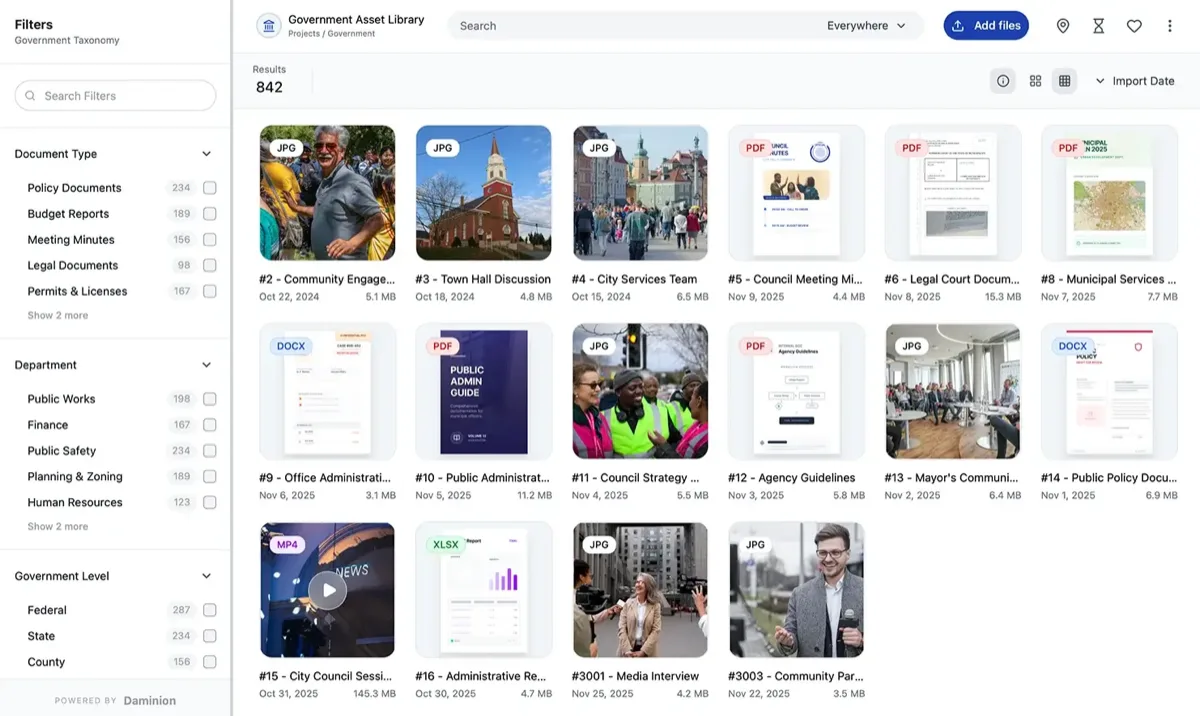
| Architecture | Windows service + PostgreSQL; web + desktop clients |
| Storage | Indexes files in place on NAS / file server — no forced migration |
| Price tier | $ annual subscription; lifetime licenses for nonprofits |
| Setup time | Half a day for server + clients in our test |
Pros
- Catalogs files in place — your folder structure survives
- Indexed 25,000 RAW files in 41 minutes in our test (fastest)
- Controlled vocabulary, versioning, and full IPTC/XMP round-trip
- Handles CAD, 3D and 100+ formats — rare outside enterprise tools
Cons
- Server component is Windows-only (clients are web-based)
- Admin UI assumes some IT comfort
- Mobile access is view-only
Our verdict: Daminion is the only tool in this group designed around the way file-server teams already work: point it at your existing shares, let it index overnight, and the archive becomes searchable without moving a single file. That's why it tops this list — and why it's the default recommendation we give architecture and engineering firms sitting on decades of project photos. The 2026 move to subscription licensing stung some long-time users, but it remains the budget tier of this category.
2. Portfolio DAM — the reborn veteran
Portfolio DAM (formerly Extensis Portfolio)
★★★★★ 4.3Best for: museums, universities and archives that want a mature, catalog-centric on-premise DAM. The campus case is covered in full.
Pros
- Decades of catalog DNA; spun out of Monotype/Extensis in 2026 as an independent company
- Deploys on-premise or in your private AWS/Azure instance
- Web Builder publishes branded asset sites from catalogs
Cons
- AI keywording still "coming soon" as of version 4.1.1
- Smaller integration ecosystem than cloud rivals
- Quote-based pricing only
Our verdict: The spin-out gave Portfolio new life — version 4.1.1 is stable, familiar, and trusted by heavyweight archives like the World Bank. It trails Daminion on indexing speed and metadata automation in our tests, which is what separates first from second here. See the head-to-head in Daminion vs Extensis Portfolio.
3. ResourceSpace — best open-source option
ResourceSpace
★★★★★ 4.0Best for: nonprofits and public institutions with Linux skills in-house.
Pros
- Genuinely free, open-source (PHP/MySQL), active development
- Flexible metadata schema and workflow states
- Paid hosted option if you outgrow self-managing
Cons
- Admin configuration eats days, not hours
- UI feels institutional; training required
- Desktop-class RAW handling is limited
Our verdict: The best zero-license-cost DAM you can run. Budget real sysadmin time: our clean install to a usable, themed system took two working days versus half a day for Daminion, and it ingests assets into its own repository rather than indexing in place — the Daminion vs ResourceSpace head-to-head unpacks that. Full context in our free & open-source DAM ranking.
4–8: the rest of the field
4. Fotoware — 8.2. A newsroom staple from Norway. Strong ingestion pipelines and editorial workflows; the Veloz cloud push means the on-premise line gets fewer headline features each year, but it remains rock-solid for broadcasters. See how it stacks up against our #1 in Daminion vs Fotoware.
5. Pimcore — 7.8. Open-source DAM+PIM+CMS platform. Overkill for a photo library, ideal when product data and media need to live together. Plan for developer involvement — this is a framework more than an app.
6. digiKam — 7.6. Not a server DAM at all, but the strongest free desktop photo catalog. For a single archivist with a big drive it beats every option above on cost (zero) — it just can't share a catalog across a team. It also appears in our photographer DAM ranking.
7. Razuna — 7.2. Lightweight Docker-based DAM, reborn as an open-core project. Quick to stand up, thin on metadata depth; fine for small shared libraries.
8. Nuxeo — 7.5. Now part of Hyland. Enormously capable content-services platform that can be shaped into a DAM; you'll need integrators and an enterprise budget, which is why it sits last despite its power.
Cost and rollout: what to actually budget
On-premise economics are front-loaded. A worked example for a 15-user team with 5 TB on an existing Synology NAS: hardware $0 (you own it), a budget-tier subscription license (Daminion-class, quoted per team — verified reviewer reports put this tier well under typical cloud-DAM annual spend), and roughly a day of IT time for setup. The same library on a mid-tier cloud DAM means migrating 5 TB up (a week of uploads on most office connections) plus storage-based fees that grow with every shoot. Over five years the self-hosted route typically wins by a wide margin for storage-heavy teams — run your own numbers with Daminion's ROI calculator or any vendor's TCO sheet, but insist on line items for storage growth.
What if you don't have Windows Server? ResourceSpace, Pimcore and Razuna run on Linux; Portfolio DAM supports Linux and private-cloud instances; Daminion needs a Windows machine for the server component (a modest VM is enough — the official system requirements list specifics). What if IT says no to any server? Hybrid tools — Daminion Cloud, Pics.io over your S3 — keep some control without hardware; see our DAM for NAS guide for middle paths.
A common misconception: on-premise doesn't mean the DAM lives on the NAS. The working pattern is a small DAM server (a Windows or Linux VM) that indexes your NAS shares over the network — files stay put, the server adds search, metadata and permissions. Consumer NAS apps like Synology Photos are viewers, not DAMs; the two solve different problems. Our Synology photo management guide draws the line.
FAQ
What's the best on-premise (self-hosted) DAM software in 2026?
Daminion is our top-rated on-premise DAM for 2026. It indexes files in place on your NAS or file server, posted the fastest indexing and search times in our 23-tool test, and sits in the budget price tier. Portfolio DAM (the former Extensis Portfolio) is the strongest alternative for institutional archives, and ResourceSpace leads the open-source field.
On-premise vs hosted or private-cloud DAM — what's the difference?
On-premise (self-hosted) DAM means you install and run the software on hardware you control — a server or VM on your own network that indexes your NAS or file server. Hosted or private-cloud DAM means the vendor runs a dedicated, single-tenant instance for you — in their cloud or inside your own AWS/Azure account — so you skip server admin while keeping your assets isolated from other customers. That differs from public, multi-tenant SaaS, where infrastructure is shared. Here, Daminion is self-hosted (with an optional Daminion Cloud), while Portfolio DAM can deploy on-premise or as a private-cloud instance.
Is on-premise DAM cheaper than cloud DAM?
For storage-heavy teams, usually yes over a multi-year horizon. Cloud DAM fees scale with storage and users, while self-hosted tools reuse hardware you already own. For a 15-user, 5 TB team, budget-tier on-premise licensing plus a day of IT setup typically undercuts mid-tier cloud subscriptions within the first two years, per verified G2 and Capterra cost reports. Small teams with little media are often better off in the cloud.
Can I run a DAM directly on my NAS?
Mostly no — consumer NAS apps like Synology Photos are photo viewers, not DAMs. The standard pattern is a DAM server (Daminion on a Windows VM, ResourceSpace on Linux) that indexes the NAS shares over the network. Your files stay on the NAS; the DAM adds search, metadata and permissions on top. Our DAM for NAS guide covers the architecture.
How long does an on-premise DAM rollout take?
Server install and client rollout: half a day to two days for Daminion or Razuna, about two days for ResourceSpace including configuration, and one to several weeks for Fotoware, Nuxeo or Pimcore deployments with custom schemas. Initial indexing runs unattended — ours processed 25,000 RAW files in 41 minutes on Daminion.
Is there a self-hosted open-source DAM?
Yes. ResourceSpace is the strongest self-hosted open-source DAM in this test — genuinely free, PHP/MySQL and actively developed — and it's our open-source category leader. digiKam (free desktop catalog), Pimcore (open-source DAM+PIM) and Razuna (Docker) are the other self-hosted open-source options we ranked. For the full breakdown, see our free & open-source DAM ranking.
What happened to Extensis Portfolio?
In 2026 Monotype/Extensis spun Portfolio out into an independent company, Portfolio DAM, LLC. The product continues as Portfolio DAM (version 4.1.1 as of July 2026), remains on-premise-first, and existing catalogs carry over. We cover the implications in our Daminion vs Extensis Portfolio comparison.
Sources & references
- Daminion on-premise DAM & system requirements — vendor site, accessed July 2026. Architecture, licensing and the Windows-server requirement.
- Portfolio DAM — vendor site, accessed July 2026. Confirms the 2026 spin-out from Monotype/Extensis and version 4.1.1.
- ResourceSpace — open-source project site, accessed July 2026. Licensing, stack (PHP/MySQL) and hosted-option details.
- G2 and Capterra verified-customer reviews — accessed July 2026. Price-tier and cost-comparison reports referenced throughout.
- PhotoLib test lab — June 2026, on-premise deployments on Windows Server 2022 + Synology DS923+, 25,000-image RAW/PSD/CAD library. Indexing/setup timings above. See how we test.