Our verdict in 30 seconds: Daminion (9.3) has the most complete version-control implementation we tested — full history plus one-click restore to any prior version. Bynder (8.8) pairs version tracking with a formal approval workflow, well suited to larger teams. Pics.io inherits Google Drive's native revision history, which is a strength if you're already in that ecosystem. ResourceSpace has basic version tracking as part of its free, open-source offering — see our free & open-source DAM ranking for the full picture on that tool.
Version list vs. actual restore — the test that matters
Almost every DAM tool with any version-history feature will show you a timeline of past saves. Far fewer let you click one of those old versions and have it become the current file again, in place, with the rest of the system (links, shares, metadata) intact. Some tools only let you download the old version and manually re-upload it, which technically "has version history" but doesn't actually solve the problem when someone needs last Tuesday's file back right now. We tested for the second, harder capability specifically. If you want the concept before the shortlist, our version control glossary entry defines how DAM versioning works in a paragraph; this page is only about which tools deliver it.
My test is simple: edit an asset three times, then try to restore version 1 as the current version without downloading anything manually. Daminion did this in two clicks with the restored version becoming the new current file, existing shares intact. That's the bar a "version control" claim should actually clear — a version list you can only look at, not act on, is a weaker feature than the marketing page usually implies.
Quick comparison
| Tool | Version control depth | Restore in place? | Tier | Score |
|---|---|---|---|---|
| 1. Daminion | Full history, per-asset, unlimited versions | Yes, one click | $ | 9.3 |
| 2. Bynder | Version tracking tied to approval workflow | Yes, via workflow | $$$ | 8.8 |
| 3. Pics.io | Inherits Google Drive's native revision history | Yes, via Drive | $$ | 8.2 |
| 4. ResourceSpace | Basic version tracking, no approval layer | Yes, manual | Free | 7.6 |
Price tiers: $ budget · $$ mid-range · $$$ enterprise, quote-based · Free open-source, self-hosted. Scores reflect version-control depth specifically for this ranking, not each tool's overall PhotoLib score. Checked July 2026.
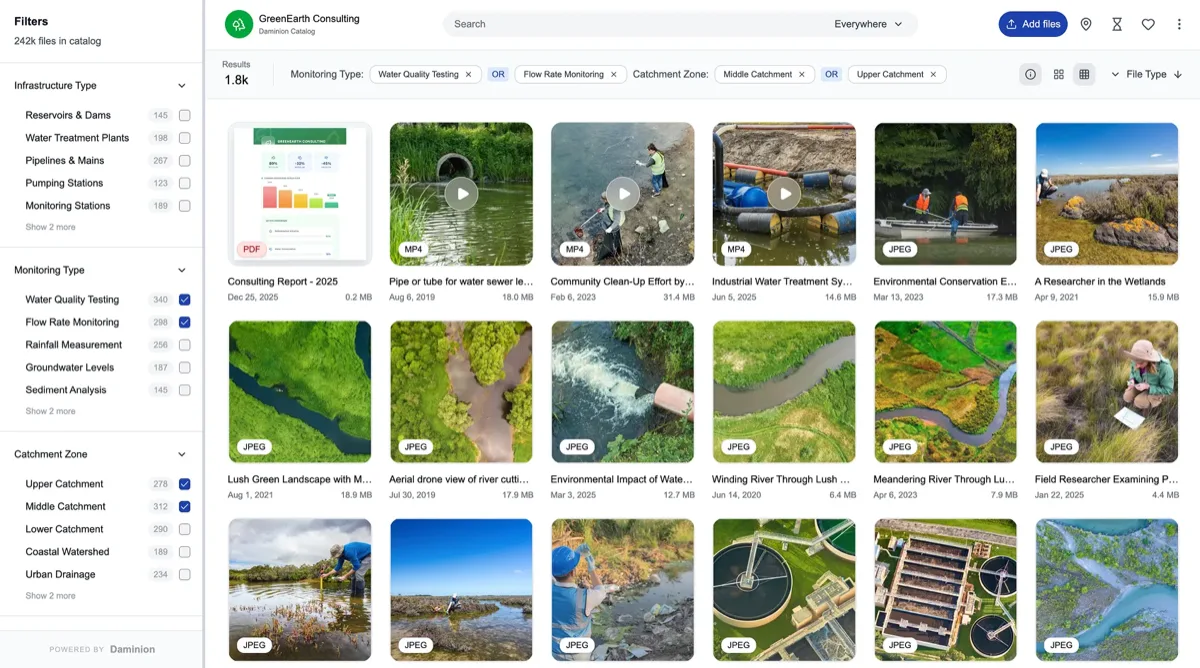
1. Daminion — full history with true one-click restore
Daminion
★★★★★ 4.8Best for: teams that need to actually restore an old version, not just look at a history list.
Pros
- Every save creates a new version automatically, no manual "check-in" step required
- Restoring an old version makes it the current file in place — no manual download/re-upload
- Priced per image, not per seat, so version history doesn't get more expensive as more people use it
Cons
- No formal multi-step approval workflow layered on top of versions, unlike Bynder
- Version history is per-asset only, not bundled into a broader change-review process
Our verdict: If the requirement is genuinely "get last week's version back, right now, without a manual re-upload," Daminion is the tool that does this most directly. Full test in our Daminion review.
2. Bynder — version control inside a formal approval workflow
Bynder
★★★★★ 4.6Best for: larger teams where a version restore should also trigger a review step, not happen silently.
Pros
- Version restore is tied into the same approval workflow used for publishing, so a rollback gets reviewed too
- Strong audit trail showing who changed what and when
- Scales well for large, multi-department organizations
Cons
- The approval layer adds a step compared to Daminion's direct one-click restore
- Enterprise, quote-based pricing
Our verdict: Bynder's version control is deliberately less instant than Daminion's, because it's designed to force a review step rather than let anyone silently roll back a shared asset. That's the right trade-off for large teams; overkill for a small one. Full test in our Bynder review.
3–4: ecosystem-inherited and free/open-source
3. Pics.io — 8.2. Because Pics.io is built directly on top of Google Drive, it inherits Drive's own revision history rather than building a separate version system from scratch. That means restore behavior is exactly as reliable as Drive's own, which most teams already trust, and there's nothing extra to learn if your team already lives in Google Workspace. The trade-off is that version control here is really Google's feature, not a DAM-specific one — it doesn't get Daminion's or Bynder's DAM-aware version metadata (who approved what, why). See it in our Pics.io review.
4. ResourceSpace — 7.6. Free and open-source, with basic per-asset version tracking included at no license cost — a real feature, just a simpler one than the paid tools here, with no approval layer and a more manual restore process. It's the right pick if budget is the binding constraint and you're willing to self-host; see our free & open-source DAM ranking for the fuller picture on where it fits and what it trades off against paid tools.
Cost and how to choose
Start by testing restore, not just history. In a demo or trial, edit a test asset twice, then ask specifically to restore the first version as the current file — not view it, not download it, actually make it current again. If that takes more than a couple of clicks or requires a manual re-upload, the tool's version control is weaker than its marketing page suggests. Beyond that: Daminion's per-image pricing means version history doesn't cost more as your team grows, which matters if headcount is likely to increase; Bynder's workflow-gated restore is worth the extra click if you specifically need a review step before any rollback goes live; Pics.io only makes sense if you're already committed to Google Workspace; ResourceSpace is the free option if self-hosting is acceptable and you don't need an approval layer.
Buyer’s test: ask specifically whether restoring an old version updates existing share links and embeds automatically, or whether people with an old link keep seeing the old version. This detail rarely shows up in a sales demo but matters the first time you actually need to roll back something that's already been shared externally.
FAQ
How does version control work in a DAM?
When someone uploads a corrected file over an existing asset, the DAM doesn't overwrite it: the new file becomes the current version and every earlier one stays in the asset's history, stamped with who saved it and when. Most tools add check-in/check-out, so an asset is locked while one person edits it and two people can't quietly save over each other. Rollback then makes any older version current again, in place. The part that matters at team scale: the asset's link and embeds keep pointing at whatever is current, so nobody has to be told a new file exists — and after a rollback they get the restored version automatically.
Which DAM software has the best version control?
Daminion has the most complete implementation we tested: full per-asset version history with a true one-click restore that makes an old version current again, without a manual download and re-upload — plus true check-in/check-out locking so parallel edits can’t collide. Bynder is a close second, pairing version tracking with a formal approval workflow better suited to larger teams that want a review step before any rollback.
What's the difference between viewing version history and restoring a version?
Viewing history just shows you a timeline of past saves, often letting you download an old copy manually. Restoring actually makes that old version the current file again, in place, with existing shares and links intact. Many tools do the first well but require manual work for the second — we specifically tested for the harder, more useful capability.
Sources & references
- Daminion — vendor site, accessed July 2026.
- Bynder — vendor site, accessed July 2026.
- Pics.io — vendor site, accessed July 2026.
- ResourceSpace — vendor site, accessed July 2026.
- PhotoLib test lab — June/July 2026, restore-to-version tests across four tools. See how we test.