Our verdict in 30 seconds: keep Synology Photos (7.7) for phone backup and family albums — it's free and good at that. The moment the NAS holds working photos — a studio archive, product shots, project documentation — put Daminion (9.4) beside it: it indexes the same shares in place and adds the search, keywords and permissions DSM will never have. Solo tinkerers: digiKam (7.6) over SMB is free and deep. The wider question of what storage gives you and what a catalog adds is covered in DAM vs NAS.
The four setups that make sense
| Setup | Best for | Cost | Effort | Score |
|---|---|---|---|---|
| A. Synology Photos alone | Families, phone backup | Free with NAS | 10 minutes | 7.7 |
| B. Daminion + NAS shares | Teams, studios, firms | Budget-tier license | Half a day | 9.4 |
| C. digiKam over SMB | One power user | Free | An hour | 7.6 |
| D. ResourceSpace in Docker | Nonprofits with IT time | Free + setup time | Two days | 7.9 |
Price tiers: $ budget · $$ mid-range · $$$ premium, quote-based. Most DAM vendors quote final pricing individually, so tiers reflect verified customer reports on G2 and Capterra rather than rate cards. Checked July 2026.
Setup A: Synology Photos — know its ceiling
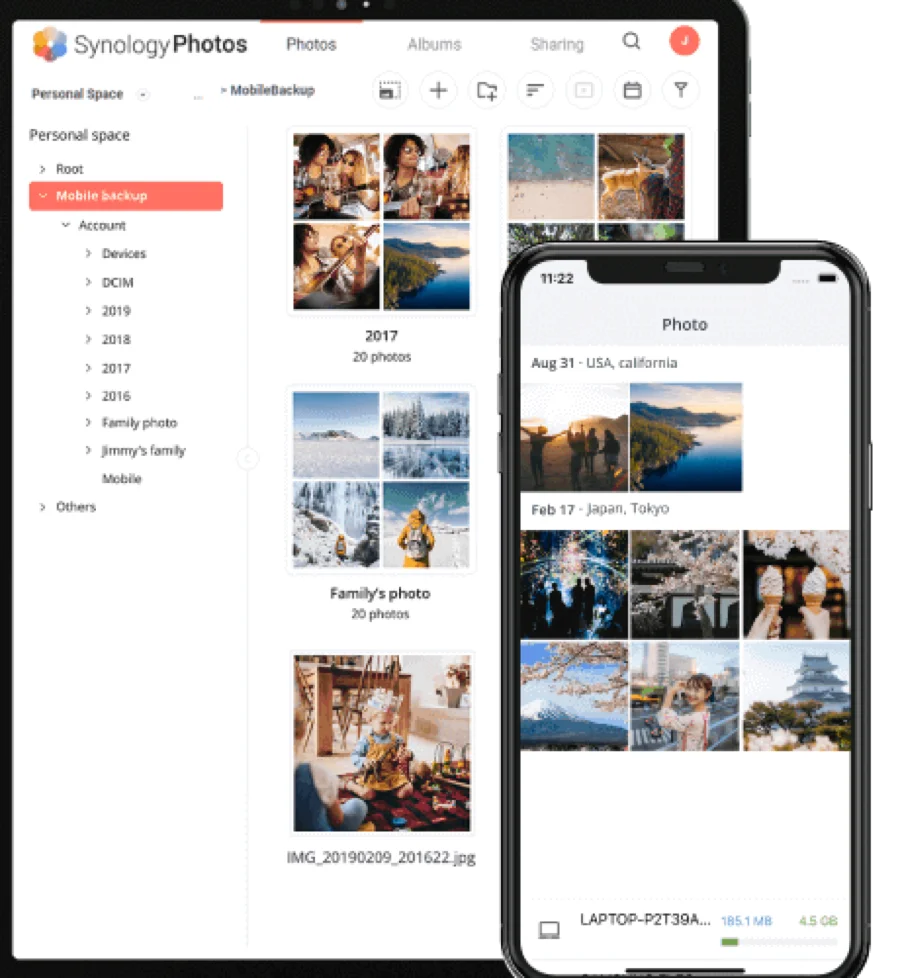
Credit where due: automatic phone backup, face grouping, map view, shared family albums, and it all ships free with DSM. In our 60k-image test it stayed responsive and its subject detection was respectable. The ceiling is professional metadata: no hierarchical keywords, no IPTC/XMP editing, no versioning, and permissions think in albums, not departments. Filename search plus faces is where it ends. If that sentence describes everything you need — stop here, you're done, spend nothing. DSM’s own face grouping is decent for family albums; how it compares with tools built for the job is covered in our face recognition ranking.
The trap: Synology Photos keeps its tags in DSM's database, not in your files. Years of album curation won't follow your photos to any other tool. If your archive matters beyond this NAS's lifespan, write metadata into files from the start — setups B–D all do.
Setup B: Daminion beside the NAS — the professional answer
Daminion + Synology shares
★★★★★ 4.8Best for: any Synology that holds working photos for more than one person.
The pattern from our DAM-for-NAS guide, applied: Daminion runs on any Windows PC or VM on the network, indexes the same shared folders Synology Photos watches, and adds what DSM can't — hierarchical keywords with synonyms, full IPTC/XMP read/write, version control, saved searches, and role-based access for the whole team through a web browser. Your phone backups keep flowing into Synology Photos; your working archive becomes an actual library. Setup took us half a day; the 60k-image first index ran through lunch. Optional AI tagging (from $3 per 1,000 images) auto-keyworded the backlog in an afternoon of review.
Pros
- Files stay on the Synology; folder structure untouched
- Real DAM features over plain SMB shares
- Budget tier; free trial to prove it on your own archive
Cons
- Needs a Windows box or VM (the NAS alone isn't enough)
- One more system to update and back up
Setups C and D — the free power routes
C. digiKam over SMB (7.6). Mount the photo share as a network drive, point digiKam's collection at it, store the database locally, enable XMP sidecars. One user gets hierarchical tags, face detection and batch metadata — free. Don't share the database between machines, and expect slower thumbnailing than local disks. The full profile is in our photographer ranking.
D. ResourceSpace in Container Manager (7.9). Higher-end Synology models run it in Docker adequately for small libraries; past ~50k assets, move it to a separate box. Two days of honest setup gets a real multi-user DAM for $0 in licenses — the trade-offs live in our open-source DAM review.
Honorable mentions. Mylio Photos (7.8) syncs a household library using the Synology as its vault — lovely for families across devices. Excire Foto (8.0) adds offline AI search over mounted shares for one user; pair it with disciplined folders.
Money and time, concretely
Worked example, July 2026: an interior design studio, 5 people, 120,000 photos on a DS1522+. Setup A costs nothing and fails the brief (no keywords by project/material/room). Setup B: Daminion budget-tier team quote + a $600 mini-PC if no Windows machine is spare; running by day two, backlog AI-tagged for roughly $360 at the $3/1,000 list rate, then an afternoon of spot-checking. Setup D saves the license but spends two days of somebody's time and owns updates forever. Five-year view: B's total stays a fraction of an equivalent cloud DAM at this storage size (mid-tier cloud plans plus 3–4 TB of storage fees compound fast, per verified G2 cost reports). What if you outgrow the NAS itself? Nothing changes: Daminion and digiKam follow the shares to any new storage — that's the point of files-in-place with embedded metadata.
FAQ
What is the best photo management software for Synology in 2026?
For families: Synology Photos, free with DSM. For professional or team archives: Daminion running beside the NAS, indexing the same shares in place — it adds hierarchical keywords, IPTC/XMP metadata, versioning and team permissions that DSM lacks. digiKam is the best free option for a single power user. Where the harder question is who may see and approve what, rather than which NAS to buy, our comparison of photo management for teams is the better starting point.
Is Synology Photos good enough for professional photographers?
No — and it isn't trying to be. It lacks hierarchical keywords, IPTC/XMP editing, RAW-aware workflows and version control, and its organization lives in DSM's database rather than in your files. It's excellent as the ingestion and backup layer; professionals add a cataloging tool on top.
Can Daminion run on the Synology itself?
No — Daminion's server needs a Windows machine or VM on the same network. The Synology keeps doing what it does best (storage, RAID, backups) while Daminion indexes its shares over SMB. Any modest PC works; the vendor's system requirements page lists specifics.
How long does it take to index a Synology photo archive?
Over gigabit LAN we measured roughly 45 minutes per 25,000 RAW files in Daminion — our 60,000-image test share finished in under two hours; six-figure archives are an overnight job. After the first pass, folder watching catches new files within minutes.
What happens to my Synology Photos albums if I switch tools?
Albums and face groups stay behind — they live in DSM's database, not in the image files. Your folders and the photos themselves are untouched and index cleanly into any DAM. Going forward, keep organization in embedded IPTC/XMP metadata so it belongs to the files, not to whichever app currently displays them.
Is Synology Photos worth it, or do serious libraries need more?
For what it targets, yes — and it's free. Automatic phone backup, face grouping, map view and shared family albums all work well, which is why it earns a 7.7 as a household hub that keeps your pictures off other people's clouds. Its ceiling is professional metadata: no hierarchical keywords, no IPTC/XMP editing, no versioning, and its organization lives in DSM's database rather than in your files. For a working or shared archive, keep Synology Photos for backup and point a real cataloging tool at the same shares.
Can I run a real DAM on a Synology NAS?
Yes, with the right split of duties. The NAS is excellent storage, but the built-in Synology Photos app isn't a full DAM. The proven pattern is to leave your files on the Synology and point a cataloging tool at the shares: Daminion (9.4) from a Windows PC or VM for teams and studios, or free digiKam and ResourceSpace for a solo user or a nonprofit with IT time. Our DAM-for-NAS ranking walks through each option.
Should I keep Synology Photos if I add a proper DAM?
Yes — run both. Let Synology Photos keep doing automatic phone backup and family sharing, and let the DAM (Daminion or digiKam) catalog the same folders for keywords, IPTC/XMP metadata and fast search. They coexist because the cataloging tool reads your files in place without moving them. Just keep your authoritative keywords in embedded metadata, not in DSM's album database, so your organization travels with the files.
Sources & references
- Synology — Synology Photos — vendor documentation for the DSM 7 photo app, accessed July 2026.
- Synology Photos — technical specifications — official feature and capacity specs, accessed July 2026.
- digiKam — open-source tool used over an SMB share (route C), accessed July 2026.
- ResourceSpace — open-source DAM run in Container Manager (route D), accessed July 2026.
- Daminion — on-premise DAM cataloging NAS shares, vendor site, accessed July 2026.
- PhotoLib test lab — July 2026; tested on a Synology DS923+ (4×8 TB SHR) with a 60,000-image working set. See how we test.