The definition
Digital Asset Management is software that stores your media files with their meaning attached. Where a file server knows a photo's name and size, a DAM knows who's in it, where it was shot, who owns the rights, which campaigns used it, and whether the license expires next March. Face grouping in particular varies wildly between tools; we tested it head to head in our DAM face recognition comparison.
One point of vocabulary, worth settling before your first vendor call: digital asset management is the discipline, and a DAM system is the software you buy to practise it. Nobody outside a conference talk keeps the two apart — ask for a DAM, a DAM system or a DAM platform and you will be shown the same product. This guide uses them interchangeably too.
Definition: Digital Asset Management (DAM) — a system for organizing, finding, and distributing media files using structured metadata, permissions, and version control. A DAM system is the software that does it. An "asset" = the file + everything known about it.
How a DAM works: the asset lifecycle
Every DAM system, from a $29 tool to a six-figure enterprise platform, moves assets through the same five stages. Understanding them is the fastest way to see what you're actually buying — and where cheaper tools cut corners.
- Ingest. Files come in — drag-and-drop, watch-folder, camera card, or an integration with Lightroom, Dropbox or a NAS. Good DAMs read embedded metadata on the way in, so a photo arrives already knowing its capture date, camera and any keywords the photographer wrote.
- Organize & enrich. The asset is filed into collections and tagged — manually, with a controlled vocabulary, or automatically with AI auto-tagging and face recognition. This is where a file becomes findable.
- Find. Users search across every metadata field, filter by facets (date, rights, project), and save searches. Search quality is the single feature people judge a DAM on day-to-day.
- Distribute. Approved assets go out — share links with expiry, branded portals, embed codes, or auto-generated renditions sized for each channel.
- Govern. Permissions, version control, approval workflows and rights/expiry tracking keep the library trustworthy as it scales. This stage is what separates a real DAM from a shared drive.
Rule of thumb: budget tools nail ingest, organize and find; the jump to mid-range and enterprise is almost entirely about distribute and govern — portals, workflow automation, SSO and audit trails.
DAM vs cloud storage, MAM, PIM & CMS
"Can't we just use Google Drive?" is the question that starts most DAM projects — usually about two years too late. Folder-based storage works until roughly the 50,000-file mark. After that, three things break: search (filenames don't describe images), rights (nobody remembers what's licensed), and consistency (seven versions of the logo, all named final).
Warning: migrating out of folder chaos gets harder every month you wait. Metadata that was never captured — who shot it, what's licensed — can't be reconstructed automatically later.
DAM also gets confused with three neighbouring systems. The short version: a DAM manages the creative files, a MAM specializes in video, a PIM manages product data, and a CMS publishes to a website. Big organizations often run several, wired together.
| System | Manages | Core strength | Use it when |
|---|---|---|---|
| DAM | Images, video, docs, brand assets | Metadata search, rights, versions, sharing | Many people reuse the same media |
| Cloud storage | Any file | Cheap capacity & sync | You only need to store & share, under ~50k files |
| MAM | Video & rich media | Proxies, timecode, editing workflows | Video production is the core job (see MAM tools) |
| PIM | Product information | SKUs, specs, syndication to channels | You sell many products online |
| CMS | Web pages & content | Publishing to a website | You're running the front-end of a site |
What a DAM actually changes
Buyers rarely regret the search speed — they regret not counting the softer wins. The five that show up in every post-rollout review:
✓ Findability
- "Where's that file?" stops being a Slack message
- Assets surface by content, not filename — even years later
✓ Brand consistency
- One approved logo, not seven files named
final - Portals ensure partners grab the current version
✓ Rights & compliance
- Licenses and model releases live with the asset
- Expiry alerts stop you using a photo you no longer own
✓ Time & single source of truth
- Less re-shooting and re-creating of lost work
- Everyone pulls from the same source of truth
Who actually needs one
Not everyone. A freelancer with 20,000 photos is well served by Lightroom. A DAM system earns its keep when multiple people need the same assets with different permissions — the moment "where's that photo?" becomes a Slack message instead of a search.
Tip: count how many times your team asked "where is that file?" last week. More than five? The search time alone likely pays for a budget-tier DAM.
What a DAM system actually does: the core features
Strip the branding off and every DAM system is assembled from the same nine capabilities. The lifecycle above is the process; this is the feature list your shortlist actually gets scored against.
- Central library & ingestion. One catalog for every asset — images, video, PDFs, brand files — fed by drag-and-drop, watch folders, camera cards or a sync from a NAS or cloud drive, reading embedded metadata on the way in.
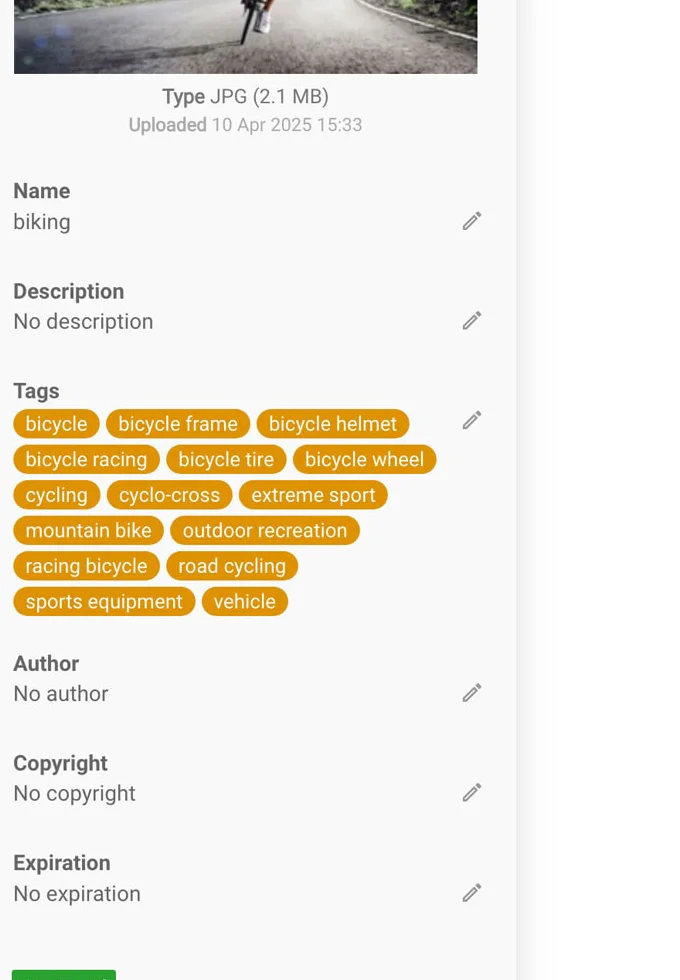
- Metadata & keywording. Structured fields built on the IPTC and XMP standards, plus custom fields of your own, applied one asset at a time or stamped across a whole shoot with templates.
- AI tagging. Automatic keyword and face suggestions that make a legacy archive searchable in days rather than months — a running start on a controlled vocabulary, not a substitute for one.
- Search & filtering. Full-text and field-level search with facets (date, rights, project, file type) and saved searches for the queries you run every week.
- Renditions. Auto-generated sizes and formats per channel, so nobody hand-exports a web JPEG from a 60 MB TIFF again.
- Sharing & portals. Expiring share links, embed codes and branded portals that let partners self-serve without handing them the whole library.
- Versioning. A tracked history of every edit, so the current file is obvious and the last one is still recoverable.
- Permissions & roles. View, download, edit and delete rights set per collection and per role, rather than per person per file.
- Integrations & API. Hooks into Adobe apps, a CMS, a PIM or your own scripts — the difference between a library people visit and one their tools pull from.
These map onto the five stages above. The first four are the ingest-organize-find half that even budget tools handle well; the rest — renditions, portals, versioning, permissions, and the API that wires the library into everything else — is what mid-range and enterprise pricing mostly buys. Which half you actually need is the question our ranking of the best DAM software is organized around.
Every vendor deck stretches that list to forty. Only five decide whether you'll still be happy in year three: metadata search across every embedded field; controlled vocabulary so "NYC", "New York" and "Manhattan" don't become three unrelated tags; version control with visible history; granular permissions down to collection level; and non-destructive export that keeps metadata intact on the way out.
That last one is the silent killer. In our 2026 test cycle, only one tool of 23 round-tripped every IPTC field without loss (the details are here). Ask every vendor to prove it in the demo — export an asset, re-import it, compare fields against the IPTC Photo Metadata standard. The metadata layer itself is built on two open standards worth knowing by name: IPTC (editorial fields: creator, caption, rights) and Adobe XMP (the extensible container most modern tools read and write), with EXIF carrying the camera's own technical data.
Types of DAM software
"DAM" covers tools that look nothing alike. Two axes matter when you shortlist — where it runs and what it's built for.
By deployment: cloud (fastest to launch, storage fees compound), on-premise (your servers, best for terabyte archives and compliance), and hybrid. Storage-heavy or NDA-bound teams lean self-hosted; most marketing teams are happy in the cloud. See the split in our rankings by deployment.
By focus: photo-first catalogs for photographers and studios; brand-and-marketing DAMs with portals and analytics; developer/API platforms; and enterprise content platforms with workflow and governance. A tool optimized for one is usually mediocre at another — which is why our rankings are split by job rather than lumped into one list.
What DAM costs in 2026
Three lanes, verified against public rate cards and G2/Capterra reports as of July 2026. Budget: $29–100/month gets entry cloud tools (Filecamp, Pics.io Solo), and budget-tier team quotes (Daminion-class) cover full-featured self-hosted deployments. Mid-range: roughly $250–800/month or low-five-figure annual quotes (Pics.io teams, Canto). Enterprise: five-figure-plus annual contracts, quote-only (Bynder, Acquia, Aprimo). Free exists too — ResourceSpace and digiKam — paid for in setup hours; our open-source guide does that math.
Timeline: self-serve tools run in 1–3 days; enterprise platforms take 6–12 weeks. Content is the long pole either way: budget a week of cleanup per 50,000 untagged files, compressible to days with AI tagging.
How to choose (and what if you get it wrong)
Start from deployment (cloud, on-premise, or hybrid — compliance and archive size usually decide), then team size, then budget tier. Shortlist three, and insist on trialing with your own files, not the vendor's curated demo library. Our rankings are organized exactly along those lines: overall, on-premise, small business, photo teams.
What if you pick wrong? If your tool wrote standards-based metadata, a mistake costs a migration weekend; if it kept tags in a proprietary database, it costs the tagging work all over again. That single architectural question — "where does my metadata live?" — is the cheapest insurance in this market. Worked example: a 60,000-file library with embedded XMP moved between two DAMs in our lab in under a day; the same library from a database-only tool needed two weeks of CSV surgery.
Key DAM terms in one place
The vocabulary vendors assume you know. Each links to a plain-English definition in our DAM glossary.
FAQ
What is digital asset management in simple terms?
Software that stores media files together with everything known about them — who made them, what's in them, who may use them — and makes all of it searchable, permissioned and versioned. Think of it as the difference between a warehouse and a library: same boxes, but one has a catalog.
What is a DAM system?
The software that does digital asset management: one central library holding your media files plus everything known about them, made searchable, permissioned, versioned and shareable from a single catalog. Strictly, DAM is the discipline and a DAM system is the tool you buy to practise it — in daily use people say both to mean the software. Below roughly 50,000 files and a single user, folders still work; past that, a DAM system is what replaces them.
What's the difference between a DAM system and a DAM tool or platform?
Nothing meaningful — they're three words for the same software. “DAM system” is how IT and procurement write it, “DAM tool” is what the people using it say, and “DAM platform” is what vendors call theirs once it has an API and a price to match. Judge a shortlist on what it does — metadata, search, permissions, portability — not on which noun the vendor picked.
What are the main features of a DAM system?
Nine, in the order assets move through one: a central library with ingestion; metadata and keywording on the IPTC/XMP standards; AI tagging; search and filtering with facets; renditions sized per channel; sharing links and branded portals; versioning; permissions and roles; and integrations or an API. Budget tools cover the first four well — portals, versioning, permissions and workflow are what mid-range and enterprise pricing mostly buys. Our core features section breaks each one down.
What's the difference between DAM and Google Drive or Dropbox?
Storage tools know filenames; DAM knows content. Concretely: search across embedded metadata, controlled keywords, version history, rights tracking and role-based permissions. Folders work fine below roughly 50,000 files — past that, the four things above are what you're missing.
How much does a DAM system cost in 2026?
Budget tools start at $29–100/month (Filecamp, Pics.io Solo) or budget-tier team quotes for self-hosted systems like Daminion. Mid-range cloud DAMs run low five figures annually; enterprise platforms (Bynder, Aprimo) start in the five figures and climb. Free open-source options cost setup and admin time instead.
How long does DAM implementation take?
Self-serve tools: 1–3 days to live, about a week to well-organized. Enterprise platforms: 6–12 weeks with vendor onboarding. Add content time regardless: roughly a week per 50,000 untagged files, much less with AI-assisted tagging.
What are IPTC, XMP and EXIF?
The three metadata standards inside your files: EXIF is what the camera records (settings, time, GPS); IPTC is editorial data people add (creator, caption, rights); XMP is Adobe's extensible container that carries both plus custom fields. A trustworthy DAM reads and writes all three losslessly — test it before buying.
How does a DAM system work?
In five stages: ingest (files come in and embedded metadata is read), organize & enrich (tagging, collections, AI auto-tagging), find (metadata search and facets), distribute (share links, portals, sized renditions), and govern (permissions, versions, rights). Budget tools cover the first three well; enterprise pricing mostly buys stronger distribute-and-govern features.
Is DAM the same as MAM or PIM?
No. A DAM manages creative files broadly; a MAM (media asset management) specializes in video with proxies and timecode; a PIM manages product information like SKUs and specs. They overlap and are often integrated, but they solve different jobs — our DAM vs MAM guide draws the line.
Do I still need a DAM if I use Lightroom?
For one photographer, Lightroom is enough — it's an editor and single-user catalog in one. The moment a second person needs the same archive with different permissions, Lightroom's catalog can't be shared safely, and a server-based DAM belongs alongside it. Both write standard XMP, so keywords stay portable. See our photographer DAM ranking.
Sources & references
- IPTC Photo Metadata Standard — photo-metadata standard, accessed July 2026.
- Dublin Core — DCMI Metadata Terms — cross-domain metadata terms, accessed July 2026.
- Daminion — example DAM platform, accessed July 2026.
- PhotoLib methodology — how we research and test DAM tools. See our methodology.