| Pricing (public) | Basic $29/mo (20 GB) · Advanced $59/mo (50 GB) · Professional $89/mo (100 GB) — all with unlimited users (July 2026 rate card) |
| Deployment | Cloud only (Swiss company, EU hosting) |
| Free trial | ✓ 30 days, no card |
| Tested | Two weeks, 15k-asset library, June 2026 |
The pricing is the story — 9.3 on value
Three plans, public prices, unlimited users on all of them, storage as the only real dial (add-ons from $10/month per 10 GB). For a 40-person company where most people just need to find and download approved files, $348–1,068 a year total is a rounding error next to per-seat competitors — the same headcount on typical per-user cloud DAM pricing runs into five figures.
Price tiers: $ budget · $$ mid-range · $$$ premium, quote-based. Most DAM vendors quote final pricing individually, so tiers reflect verified customer reports on G2 and Capterra rather than rate cards. Checked July 2026.
Worked example: a nonprofit with 6 staff and 200 volunteers who need photo access: Filecamp Advanced at $59/month serves all 206 accounts for $708/year. No per-seat tool on the market touches that. The catch arrives as your library (not team) grows — 50 GB is roughly 10,000 high-res images, and heavy media archives outgrow the storage tiers quickly.
"Unlimited users" is the kind of claim I don't take on faith, so on the $29 Basic plan I sat there and created 60 accounts — different roles, folder permissions, the works — and nothing throttled or asked me to upgrade. That reframes the whole buying decision: you stop rationing logins and just give everyone who needs a file their own account. The number that actually constrains you here is gigabytes, not people — which is exactly backwards from every per-seat DAM I test, and the entire reason this one exists. Full protocol: how we test.
Features — 7.4, and honest about it
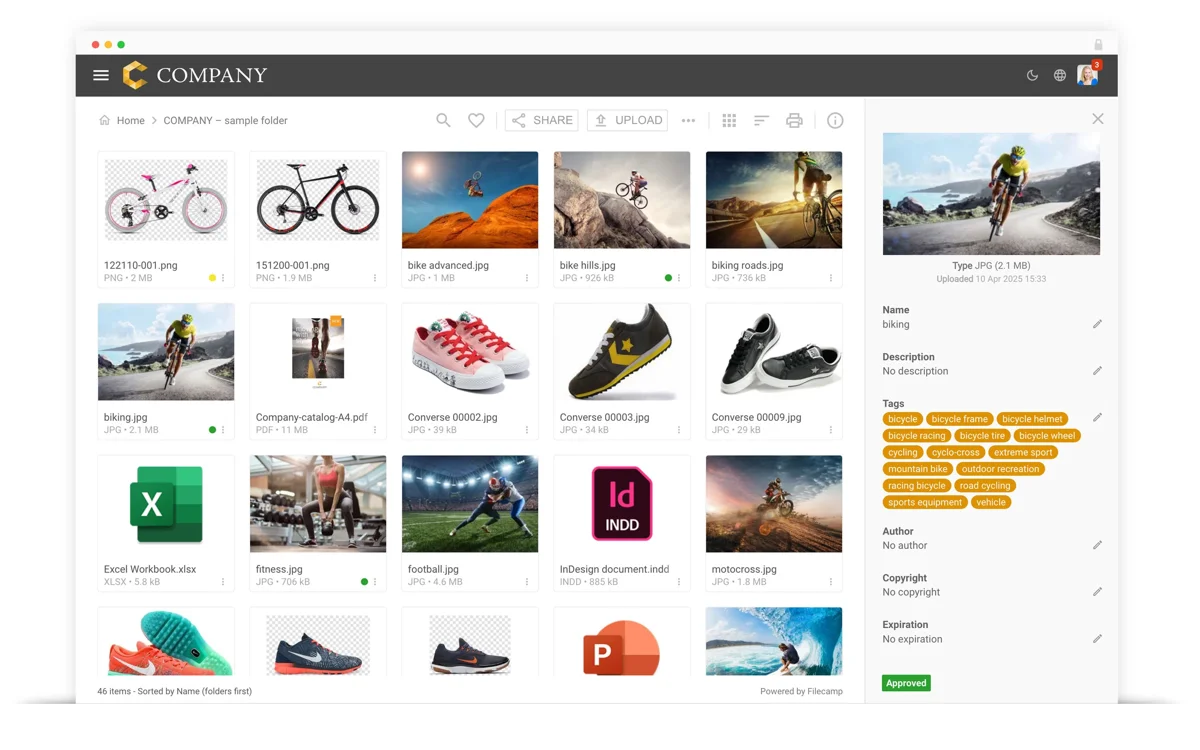
What's there. Clean folder-based library, custom branding per workspace (multiple themes on Advanced+), granular folder permissions, labels, AI auto-tagging (Advanced+), online proofing with comments (Professional), WebDAV upload, and white-labeling that lets agencies resell the platform as their own. Everyday use is friction-free — our test users needed no training.
What's not. This is folder-thinking, not metadata-thinking: no controlled vocabulary, no hierarchical keywords, modest custom fields. Our IPTC round-trip preserved 68% of fields. No version stacks beyond simple file replacement, no RAW intelligence, basic video preview. Search is filename-and-tags — fine at 15,000 assets, limiting at 100,000. Teams with archival ambitions should read our Daminion for what full metadata control looks like.
Know the ceiling before you buy: Filecamp is folder-thinking, not metadata-thinking. Our IPTC round-trip kept just 68% of fields, there's no controlled vocabulary or real version history, and search is filename-and-tags only. That's completely fine for distributing approved files to a crowd — but if you need searchable, standards-based metadata on a growing archive, you'll hit the wall fast. See metadata-first tools instead.
Tester's tip: size your plan by library, not team. Because users are unlimited, the only number that costs you is storage — 50 GB is roughly 10,000 high-res photos. Estimate your gigabytes 12 months out, and if you're heading past a few terabytes, price a self-hosted tool before you commit: Filecamp's storage add-ons get steep at scale.
Pros & cons
What we liked
- Unlimited users on every plan — unique in the category
- Transparent public pricing from $29/month
- Custom branding and white-label options
- 30-day trial; month-to-month, cancel anytime
What could be better
- Shallow metadata: 68% IPTC round-trip, no controlled vocabulary
- Storage tiers are tight for media-heavy archives
- No real versioning or RAW workflows
- Search runs out of depth on large libraries
Who is Filecamp for?
✓ Choose Filecamp if you…
- Distribute approved files to many casual users or clients
- Want brandable client spaces at agency scale
- Need predictable costs under $100/month
- Have a library measured in gigabytes, not terabytes
✗ Skip it if you…
- Manage RAW archives or need real metadata — see Daminion
- Hold 100k+ assets — see stronger search tools
- Need workflows and approvals at org scale — see Bynder
Final verdict
Very good — 8.1/10
Filecamp knows exactly what it is: the cheapest credible way to give an unlimited crowd organized, branded access to your files. It wins our value sub-score outright and anchors the budget end of our small-business ranking. Just be honest about the ceiling — when metadata, versioning or six-figure asset counts enter the conversation, you've outgrown it.
FAQ
Is Filecamp a good DAM in 2026?
For its niche, yes — 8.1/10 in our June 2026 review. Unlimited users from $29/month is unmatched value for distributing files to large casual audiences. Its metadata depth, versioning and search don't compete with full DAMs — that's the trade for the price.
How much does Filecamp cost?
Public rates as of July 2026: Basic $29/month (20 GB), Advanced $59/month (50 GB), Professional $89/month (100 GB) — every plan with unlimited users. Extra storage from $10/month per 10 GB. A 30-day free trial requires no credit card, and billing is month-to-month.
Is unlimited users really unlimited?
Yes — we created 60 test accounts on the Basic plan without restriction, and the vendor confirms no user caps on any tier. Permissions are folder-based, so casual users see only what you grant. The business model charges for storage, not people.
How long does Filecamp take to set up?
The fastest in our test group: workspace, branding, folder structure and first users in an afternoon. Uploading and labeling a 15,000-asset library took us two more days. There's no server, no onboarding program to schedule — and honestly no need for one.
What if we outgrow Filecamp's storage tiers?
Storage add-ons scale to 20 TB on the public price list, but costs accelerate ($300/month per extra TB at mid tiers) — past a few terabytes, self-hosted tools on your own storage become dramatically cheaper. Since Filecamp keeps your folder structure intact and files export cleanly, migration to a heavier DAM is a straightforward weekend job.
Sources & references
- Filecamp — pricing & plans — vendor site, accessed July 2026. Public rate card (Basic/Advanced/Professional), unlimited-users policy, storage add-ons.
- Filecamp — product & interface — vendor site, accessed July 2026. Interface screenshot, branding, permissions and proofing feature set.
- IPTC Photo Metadata Standard — International Press Telecommunications Council. Reference for the 68% metadata round-trip figure.
- Filecamp reviews on G2 — accessed July 2026. Verified-customer reports on value and ease of use.
- PhotoLib in-house test — two weeks with a 15,000-asset agency-style library and 60 test user accounts, June 2026. Unlimited-users check, setup time and round-trip figures above. See how we test.